2. Your First Smart Contract on Arbitrum#
Now it is time to get our hands dirty. All of us are going to develop and deploy our first smart contract. It will be fun!
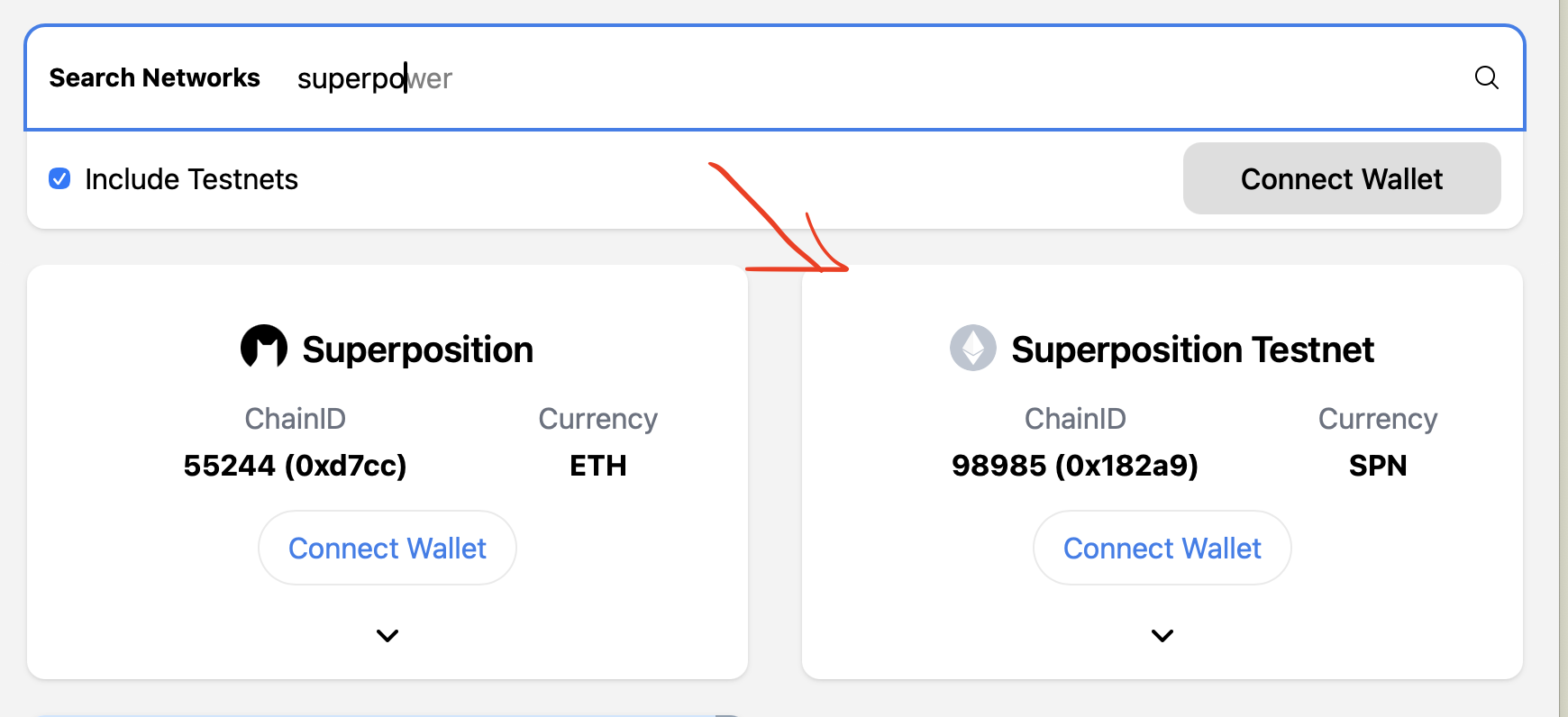
First of all, before we begin there are some steps we need to do to have everything setup. Firstly, if you don’t already have one, install an ethereum wallet to your browser. Usually Metamask is the easiest to start with. After this is installed, I want you to go to Chainlist, check the “include testnet” field, and search for SuperPosition and add “Superposition Testnet”. Lastly, I want you to go to the SuperPosition faucet, and request some testnet funds.
Let us all go to https://remix.live . We don’t have to download anything at this point, don’t worry. Start by navigating to the editor, then underneath the folder “Contracts”, add a new file called “EthCluj.sol”. Before we can get to coding some real programs, there are a couple of boilerplate things we need to add to our file. Namely:
// SPDX-License-Identifier: MIT
pragma solidity 0.8.34;

contract EthCluj {}
Don’t worry if this looks scary, lets break it all down piece by piece! The first line refers to what license our code has. There are multiple different types of software licenses, but for this example, lets use MIT. Note that your smart contract will not compile if the first line of all of the .sol files does not include a license. Next up is the “pragma solidity 0.8.34;”. Here we are telling solidity what compiler to use. Since each EVM is filled with different smart contracts that are all developed using different compiler versions, each contract is separately responsible of stating their own compiler version. Final line is where the fun begins. This line is initiating a new contract, ready to be defined. Inside of those “{}” is where your creativity starts, and where we as smart contract developers will spend most of our time. Lets start by adding something here. You are going to chose your favorite number right now. Im going to use “42” for now. Then, we are going to add to the contract so it looks like this:
// SPDX-License-Identifier: MIT
pragma solidity 0.8.34;

contract EthCluj {
	uint256 public myFavoriteNumber = 42;
}
We added our favorite number to the contract, and it is now public, meaning that we can query the smart contract to retrieve it. Now, lets go to the “compile” button, then after this we go to the “deploy” button. You did it! You successfully developed and deployed your own smart contract. Let us try it out! Underneath the “Deployed Contracts” section you can see your “EthCluj.sol” contract. Once you press the contract, it will expand and you will see “call myFavoriteNumber”. Now press it. It should return the number you just chose, awesome!
However, this contract doesn’t really do much yet. We can just see your once stated favorite number, what if you change your mind? Lets implement a function where we’ll address just that:
// SPDX-License-Identifier: MIT
pragma solidity 0.8.34;

contract EthCluj {
	uint256 public myFavoriteNumber = 42;

	function changeFavoriteNumber(uint256 _newFavoriteNumber) external {
		myFavoriteNumber = _newFavoriteNumber;
	}
}
Lets break these new lines down again! We now added a function with the Solidity keyword “function”. After this we chose the name for this function. This could have been any arbitrary name, but in this specific case the name is “changeFavoriteNumber”. Feel free to change this if you want! After the name we open up parentheses: “()”. These can either be empty, or as in this case, hold what is known as function arguments. These are fields that we need to provide our function with in order for it to do its thing. For now, think about this as your way to let the function know what your new favorite number is. Same as the function name, this field is arbitrary and you can name it whatever you want, as long as you prefix it by the type, i.e. uint256. Side note here; you see that i started my function argument name with an underscore. This is optional, and not something you have to do, but I find that when you’re working in large codebases with more complex code, it is easier to read and reason about since this is signaling that this variable comes from a function signature, and not a global variable.
Last word in this line is “external”. This is again a keyword of the solidity programming language, and it refers to the visibility of this function. Here, we as smart contract developers have to stop and think for a bit before we chose the visibility of said function. There are 4 different visibilities, namely “public”, “private”, “external” and “internal”. Using these 4 correctly will help you writing more safe smart contract so lets go through the different meanings here.
Public - Least restrictive. These functions can be called from anywhere. Meaning that the contract itself can call this function, but also other contracts or users can call this function.
External - These functions are ONLY callable from outside of the contract. The contract it self cannot call them, but outside contracts and users can
Internal - These functions can ONLY be called from inside of the contract. Other contracts or users cannot call them, but they can be building blocks of public phasing functions. If a contract inherits another contract, and the inherited contract has internal functions, the inheriting contract can call them.
Private - Most restrictive. These functions can only be called from inside the SAME contract. Inheriting contracts cannot reach them.
So how do you chose here? My recommendation to do this in a no-brainer kind of way is the following: default to “external” for public facing functions, and “private” for private facing functions and only change them to “public” and “internal” when you have to. This way, your contracts will be a bit stricter by default, which is a good thing.
Now, lets compile and deploy it again. In the same button where we expanded our contract, you will now see that there is, along side with “call myFavoriteNumber” a field that says ”non-payable changeFavoriteNumber uint256”. When we press this we will get a field that prompts us for our new favorite number. Fill this in and press “Transact”! After this prompt the “call myFavoriteNumber” button again and see your new favorite number appear.
What we have explored so far is a state changing function. This means that we have our favorite number in the contracts storage, then we change the storage space to our new favorite number and update this. The fact that the contract says “uint256 public myFavoriteNumber = 42;” doesn’t matter, since this only represents what our favorite number is once the contract is deployed, but it doesn’t mean it cant be overwritten.
We can also write functions that aren’t state changing. Coming from a traditional IT background you can think of these as read functions, or even “Getters” for the more CRUD oriented dev. Here we have, same as the visibility of the functions, two options on how we can initiate non state changing functions. These are two modifiers called pure and view. Here is how to think about them:
View functions are for non state changing functions which reads anything from the storage within the smart contract. If this function is reading a variable from the contract, or calling other functions that do so, it must be a view function.
Pure functions cannot read global state, they can only read what is either passed into the function, or what is defined within the function and therefore. What it CAN do though is that it also can read constants.
Lets create a view function that is multiplying our favorite number by 2 and returning this number to us:
// SPDX-License-Identifier: MIT
pragma solidity 0.8.34;

contract EthCluj {
	// Our initial starting number is 42, but this is subject to change
	uint256 public myFavoriteNumber = 42;

	function changeFavoriteNumber(uint256 _newFavoriteNumber) external {
		myFavoriteNumber = _newFavoriteNumber;
	}

	function timesTwo() external view returns (uint256 _res) {
		_res = myFavoriteNumber * 2;
	}
}
The word “return” means that the function is returning a value. All read functions need this, but state changing functions can also use them. In this scenario, we are returning a variable that we call _res (short for result). Within the function, you can see that we are fetching the myFavoriteNumber from storage, multiplying it by 2, then assigning this to the variable _res. We could have written this function as:
function timesTwo() external view returns (uint256 _res) {
	return myFavoriteNumber * 2;
}
This is valid solidity and would have worked the same, but personally I find it a bit easier to read the first version I showed you, so I will stick to that.
You can also chain functions together. Lets do a function where we take our first favorite number, multiply that by 2, and then update that as our new favorite number, while also returning the new number, fully using the functions we created so far:
// SPDX-License-Identifier: MIT
pragma solidity 0.8.34;

contract EthCluj {
	// Our initial starting number is 42, but this is subject to change
	uint256 public myFavoriteNumber = 42;

	function changeFavoriteNumber(uint256 _newFavoriteNumber) external {
		myFavoriteNumber = _newFavoriteNumber;
	}

	function timesTwo() external view returns (uint256 _res) {
		_res = myFavoriteNumber * 2;
	}

	function chain() external returns (uint256 _res) {
		// We call the changeFavoriteNumber function,
		// and pass in the result of timesTwo() this means
		// that myFavoriteNumber has gotten updated with this
		// new value
		changeFavoriteNumber(timesTwo());
		// Secontdly, we fetch our favorite number from storage
		// And assign it to the _res return argument
		_res = myFavoriteNumber;
	}
}
Exciting! We did a lot now, lets try to compile this contract. Do the same thing we did before and navigate to the compile button and press it! Oh… we got our first compilation error…
“DeclarationError: Undeclared identifier. "changeFavoriteNumber" is
not (or not yet) visible at this point.”
This might seem confusing at first, but think back to what we said about visibility. Since changeFavoriteNumber() and timesTwo() are both external functions they cant be called from inside of this contract. We still want the 2 of them to be reachable for the end user too. Therefore, lets simply change this to be “public” instead of “external” :
// SPDX-License-Identifier: MIT
pragma solidity 0.8.34;

contract EthCluj {
	// Our initial starting number is 42, but this is subject to change
	uint256 public myFavoriteNumber = 42;

	function changeFavoriteNumber(uint256 _newFavoriteNumber) public {
		myFavoriteNumber = _newFavoriteNumber;
	}

	function timesTwo() public view returns (uint256 _res) {
		_res = myFavoriteNumber * 2;
	}

	function chain() external returns (uint256 _res) {
		// We call the changeFavoriteNumber function,
		// and pass in the result of timesTwo() this means
		// that myFavoriteNumber has gotten updated with this
		// new value
		changeFavoriteNumber(timesTwo());
		// Secontdly, we fetch our favorite number from storage
		// And assign it to the _res return argument
		_res = myFavoriteNumber;
	}
}
Try to hit the compilation button again, now it should work. Awesome! However our contract has one problem if we think about the real world for a bit. This contract only allows for one favorite number, and we don’t know who’s. Solidity has another awesome feature called mapping, that might just do the trick for this. What is a mapping? A mapping is a variable that stores values, associated with other values. An example, you pass in a persons name, it returns this persons favorite number. The syntax for these are a bit weird so stick with me here. In its most simple form you could write it like:
mapping(string => uint256) favoriteNumberOf;
This is fine and valid Solidity. But as you might know by now, I really like to focus on readability, and you can actually name the fields of this mapping, so lets do that:
mapping(string who => uint256 favoriteNumber) favoriteNumberOf;
This will basically be a variable that you can query favoriteNumberOf, then pass in a name, and it will return their favorite number if it has any. Lets modify our code to use this, and clean out the timesTwo:
// SPDX-License-Identifier: MIT
pragma solidity 0.8.34;

contract EthCluj {
	mapping(string who  => uint256 favoriteNumber) public favoriteNumberOf;

	function changeFavoriteNumber(string memory _who, uint256 _newFavoriteNumber) external {
		// You query a mapping using the square brackets like this:
		favoriteNumberOf[_who] = _newFavoriteNumber;
	}
}
Now compile and deploy your new contract. When expanding this contract you will now see “non-payable changeFavoriteNumber string uint256” and “call favoriteNumberOf string”. Start by calling changeFavoriteNumber and pass in your name as _who, and your favorite number as _newFavoriteNumber. After this, call favoriteNumberOf and send in your name. This should return your favorite number. Try adding a few peoples favorite numbers and query the contract for them.
Now, it is time for another concept here. When interacting with any state changing function on an EVM compatible chain, you are doing so through a wallet. A wallet is your identity on the blockchain, and it holds a public key, or an address, that acts as a form of ID for you. Solidity has a type for addresses, which is something that you will use a lot in your journey as a smart contract developer. Maybe 2 people have the same name, but they will never have the same address. Lets change our favoriteNumberOf mapping to take the address of the user rather than their name:
mapping(address who => uint256 favoriteNumber) favoriteNumberOf;
This is good. Really good. But what if we liked being able to see the names too? Can our mapping hold two values? Yes it can! Through something called structs. A solidity struct is a custom datatype that consists of other datatypes. If you come from an IT background you can kind of think about it like JSON. The syntax for defining a struct looks like this:
struct Info {
	uint256 favoriteNumber;
  string name;
}
Then we can have our mapping point to this:
mapping(address who => Info info) public favoriteNumberOf;
Now, you can query this mapping using a users address, and you will receive their name and favorite number.
We can actually avoid having to pass in 3 arguments into our changeFavoriteNumber() function. In EVM land, each function call creates a message called “msg”, that carries information about this specific call, and can be queried within this function. This object has a field “msg.sender” that returns the address of the caller of this current call, which we can use when setting the value to our mapping. Lets type it all out:
// SPDX-License-Identifier: MIT
pragma solidity 0.8.34;

contract EthCluj {

  struct Info {
    uint256 favoriteNumber;
    string name;
  }

  mapping(address who  => Info info) public favoriteNumberOf;

	function changeFavoriteNumber(string memory _who, uint256 _newFavoriteNumber) external {
		// Map a new instance of the info struct to the address of the caller
		favoriteNumberOf[msg.sender] = Info(_newFavoriteNumber, _who);
	}
}
This is starting to get good. But what if we want the contract to know your favorite number and name from the start, a bit similar to what the “uint256 public myFavoriteNumber = 42;” line in our first version of this contract did. We can do this in an elegant way that is in line with Solidity best practices. We can make use of a solidity keyword called “constructor”. Think of the constructor as a solidity function, that will only happen once; when the contract is actually created. It cannot be called again after that. Similar to a function, a constructor can take arguments. However it cant contain return arguments. Let us add a constructor that calls our changeFavoriteNumber(), dont forget to change the visibility of changeFavoriteNumber to public!:
// SPDX-License-Identifier: MIT
pragma solidity 0.8.34;

contract EthCluj {

  struct Info {
    uint256 favoriteNumber;
    string name;
  }

  mapping(address who  => Info info) public favoriteNumberOf;

	constructor (string memory _myName, uint256 _myFavoriteNumber) {
		changeFavoriteNumber(_myName, _myFavoriteNumber);
	}

	function changeFavoriteNumber(string memory _who, uint256 _newFavoriteNumber) public {
		// Map a new instance of the info struct to the address of the caller
		favoriteNumberOf[msg.sender] = Info(_newFavoriteNumber, _who);
	}
}
We hit compile and we go to the deploy button, and we deploy. But we notice that the deploy button all of a sudden looks different. We see that we now have to provide _myName and _myFavoriteNumber before we can actually deploy this. You can test pressing the deploy button without providing these, but this wont work. This means that each contract deployed will now contain the deployers name and favorite number.
Before we wrap things up here, I want to cover one last thing. In order to interact with our smart contract, we need a front end to connect to it. Sometimes it can be a bit hard for the front ends to get the information it needs from our contract in order to show the information it needs to provide users with a great experience. What if we want it to show up on a page when someone adds their name and favorite number to the contract? Solidity has a way to deal with this, and it is called “events”. The usual pattern is that you emit an event by the end of a state changing function with the relevant information. We create the event using this syntax:
event FavoriteNumberChanged(string who, uint256 newFavoriteNumber);
This is the form that will be returned once this event is emitted. Now lets add this to our contract:
// SPDX-License-Identifier: MIT
pragma solidity 0.8.34;

contract EthCluj {

  struct Info {
    uint256 favoriteNumber;
    string name;
  }

  mapping(address who  => Info info) public favoriteNumberOf;

  event FavoriteNumberChanged(string who, uint256 newFavoriteNumber);

	constructor (string memory _myName, uint256 _myFavoriteNumber) {
		changeFavoriteNumber(_myName, _myFavoriteNumber);
	}

	function changeFavoriteNumber(string memory _who, uint256 _newFavoriteNumber) public {
		// Map a new instance of the info struct to the address of the caller
		favoriteNumberOf[msg.sender] = Info(_newFavoriteNumber, _who);
		// We emit the envent with relevant fields
		emit FavoriteNumberChanged(_who, _newFavoriteNumber);
	}
}
The last step of our journey here will be to, in the “Deploy and Run Transactions” side tab, swap the Environment from Remix VM to “Browser Extension” and then choose “Metamask”. Make sure that you are currently on the SuperPosition Testnet. Then you can try to hit the deploy button again and try all the functions directly on an actual chain.
Wow, we definitely learned a lot today. From what we learned now, I have prepared some smart contract challenges.